Local-linear boundary behavior
What this example reviews
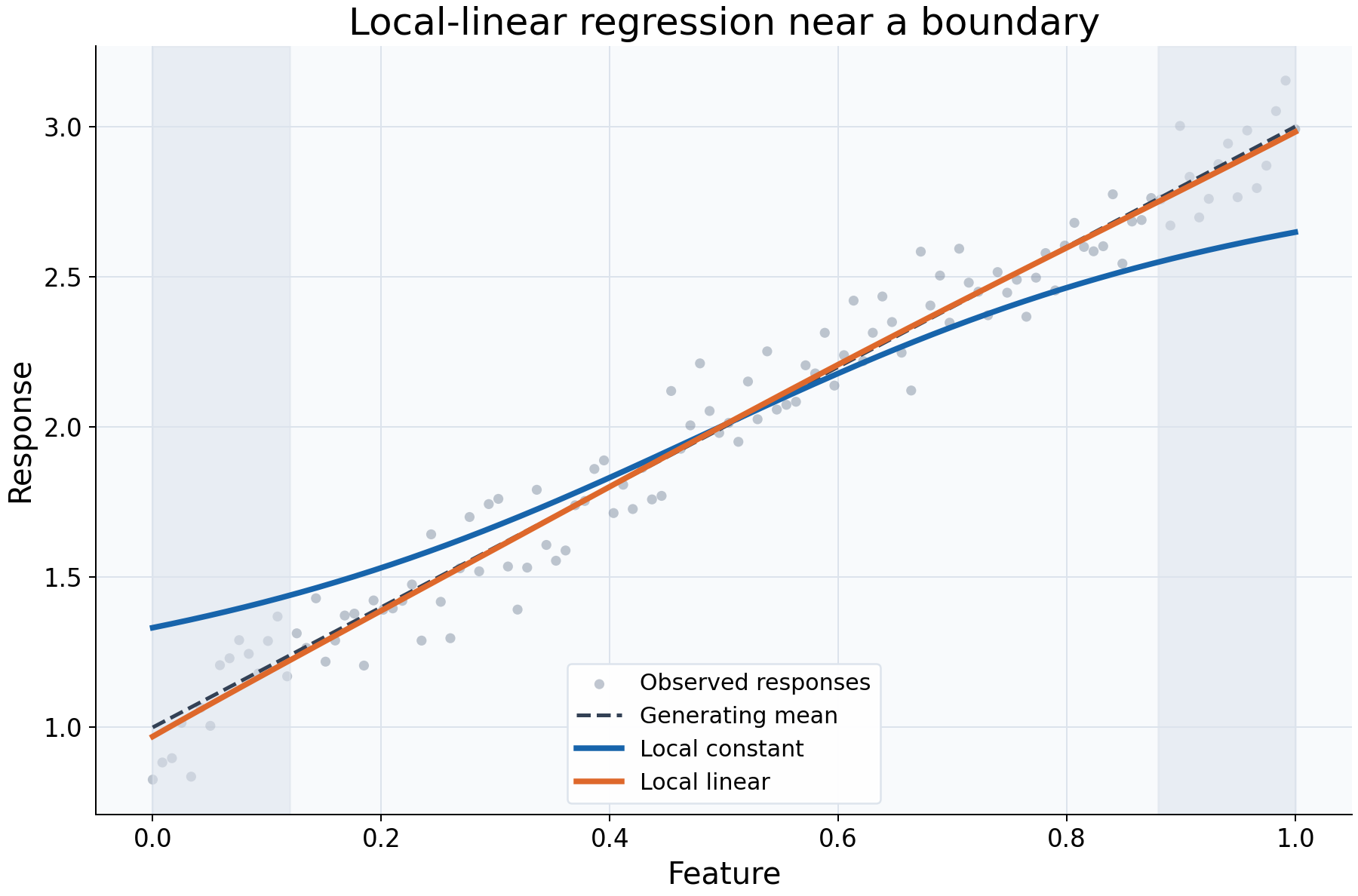
This example compares a local constant with a local linear regression near the ends of an observed feature range. The generating mean is a straight line, so edge behavior is easier to distinguish from unknown curvature. Both fits use the same data, Gaussian kernel, bandwidth 0.22, and evaluation locations.
Choices and their impact
| Item | What is being reviewed | Impact and interpretation |
|---|---|---|
| Gray observations | Noisy samples around a linear mean | Supply the same local information to both estimators. |
| Dashed generating line | The reference relationship | Allows visible edge deviations to be interpreted in this simulation. |
| Local-constant curve | A distance-weighted average of nearby responses | Near an edge, observations mostly lie on one side, pulling the average toward that side's responses. |
| Local-linear curve | A local weighted intercept and slope | Uses a slope to describe the one-sided neighborhood and can reduce the local constant's boundary bias. |
| Shaded edge regions | Locations where neighborhoods are asymmetric | Guide attention to boundary behavior. These are neither confidence bounds nor unsupported regions. |
Interpreting the plot
Compare each curve's distance from the dashed reference near the left and right edges, then compare their behavior in the interior. Local linear fitting can be helpful where averaging over a one-sided neighborhood shifts the estimate away from the relationship at the query itself.
A local linear curve does not impose one global straight line: a separate local
fit is evaluated at every query. Its equivalent response coefficients can be
negative, so values can overshoot the observed response range. When a slope cannot
be resolved, inspect local_linear_fallback; the configured singular policy
controls whether the estimator falls back or raises.
When this is useful
Use this comparison when edge behavior matters in a feature-response description or when a local-constant curve seems to flatten toward the training boundaries. It separates the choice of local fitting order from the choice of bandwidth.
The example evaluates inside the observed range. Improved behavior at its edges does not validate predictions beyond the range, and local linear fitting does not guarantee a monotone or bounded response curve.
Explore further
Reduce the sample size or create repeated feature values to inspect fallback
flags. Compare get_weights([query], kind="prediction") with kind="kernel"
near an edge to see how signed local-linear coefficients differ from positive
kernel weights.
Run this example
From the checkout, with rgram[plot] installed:
python examples/plot_relationships.py --example boundary
# Save just this figure without opening a desktop window:
python examples/plot_relationships.py --example boundary --output-dir /tmp/rgram-figures
Download this standalone example.
The complete code below includes imports, data, configuration, and plotting.
Run the downloaded file with python boundary.py.
from __future__ import annotations

import argparse
from pathlib import Path
from typing import TYPE_CHECKING
import warnings

import numpy as np

from rgram import KernelSmoother, Regressogram, SupportWarning, quantile

if TYPE_CHECKING:
    from matplotlib.axes import Axes
    from matplotlib.figure import Figure

# A consistent palette makes comparisons readable across the gallery.
COLORS = ["#1764ab", "#de682b", "#21856b", "#8855a2"]


def _create_axes(
    title: str, xlabel: str = "Feature", ylabel: str = "Response"
) -> tuple[Figure, Axes]:
    """Create a readable, single-panel figure with consistent gallery styling."""
    import matplotlib.pyplot as plt

    with plt.rc_context({"font.size": 14, "axes.labelsize": 16, "axes.titlesize": 20}):
        figure, ax = plt.subplots(figsize=(10, 6.6), layout="constrained")
        ax.set(title=title, xlabel=xlabel, ylabel=ylabel)
    ax.set_facecolor("#f8fafc")
    ax.grid(color="#dce3ec", linewidth=0.8)
    ax.set_axisbelow(True)
    ax.spines[["top", "right"]].set_visible(False)
    ax.tick_params(labelsize=13)
    return figure, ax


def _plot_observations(ax: Axes, X: np.ndarray, y: np.ndarray) -> None:
    """Show original rows without connecting them or hiding response spread."""
    ax.scatter(
        X,
        y,
        color="#64748b",
        alpha=0.4,
        s=28,
        edgecolors="none",
        label="Observed responses",
    )


def _add_legend(ax: Axes) -> None:
    """Identify every plotted comparison using the same readable legend style."""
    ax.legend(fontsize=12, framealpha=0.96, edgecolor="#dce3ec", loc="best")


def _gaussian_smoother(bandwidth: float, **kwargs) -> KernelSmoother:
    """Keep kernel and bandwidth units explicit; kwargs select other model options."""
    return KernelSmoother(
        kernel="gaussian", bandwidth="manual", bandwidth_value=bandwidth, **kwargs
    )


def boundary() -> Figure:
    """Show why a local slope can help near the observed feature boundaries."""
    rng = np.random.default_rng(8)
    X = np.linspace(0, 1, 120)
    # A linear generating mean makes edge bias easier to distinguish from curvature.
    y = 1 + 2 * X + rng.normal(0, 0.1, len(X))
    query = np.linspace(0, 1, 250)
    figure, ax = _create_axes("Local-linear regression near a boundary")
    _plot_observations(ax, X, y)
    ax.plot(query, 1 + 2 * query, "--", color="#334155", lw=2, label="Generating mean")
    # Change only the local fitting order, keeping kernel and bandwidth equal.
    for regression, color in zip(("local_constant", "local_linear"), COLORS):
        model = _gaussian_smoother(0.22, regression=regression).fit(X, y)
        ax.plot(
            query,
            model.predict(query),
            color=color,
            lw=3,
            label=regression.replace("_", " ").capitalize(),
        )
    # These bands mark regions with asymmetric neighborhoods, not confidence bounds.
    ax.axvspan(0, 0.12, color="#dce3ec", alpha=0.55)
    ax.axvspan(0.88, 1, color="#dce3ec", alpha=0.55)
    _add_legend(ax)
    return figure

if __name__ == "__main__":
    import matplotlib.pyplot as plt

    figure = boundary()
    plt.show()
    plt.close(figure)