Comparing subgroups
What this example reviews
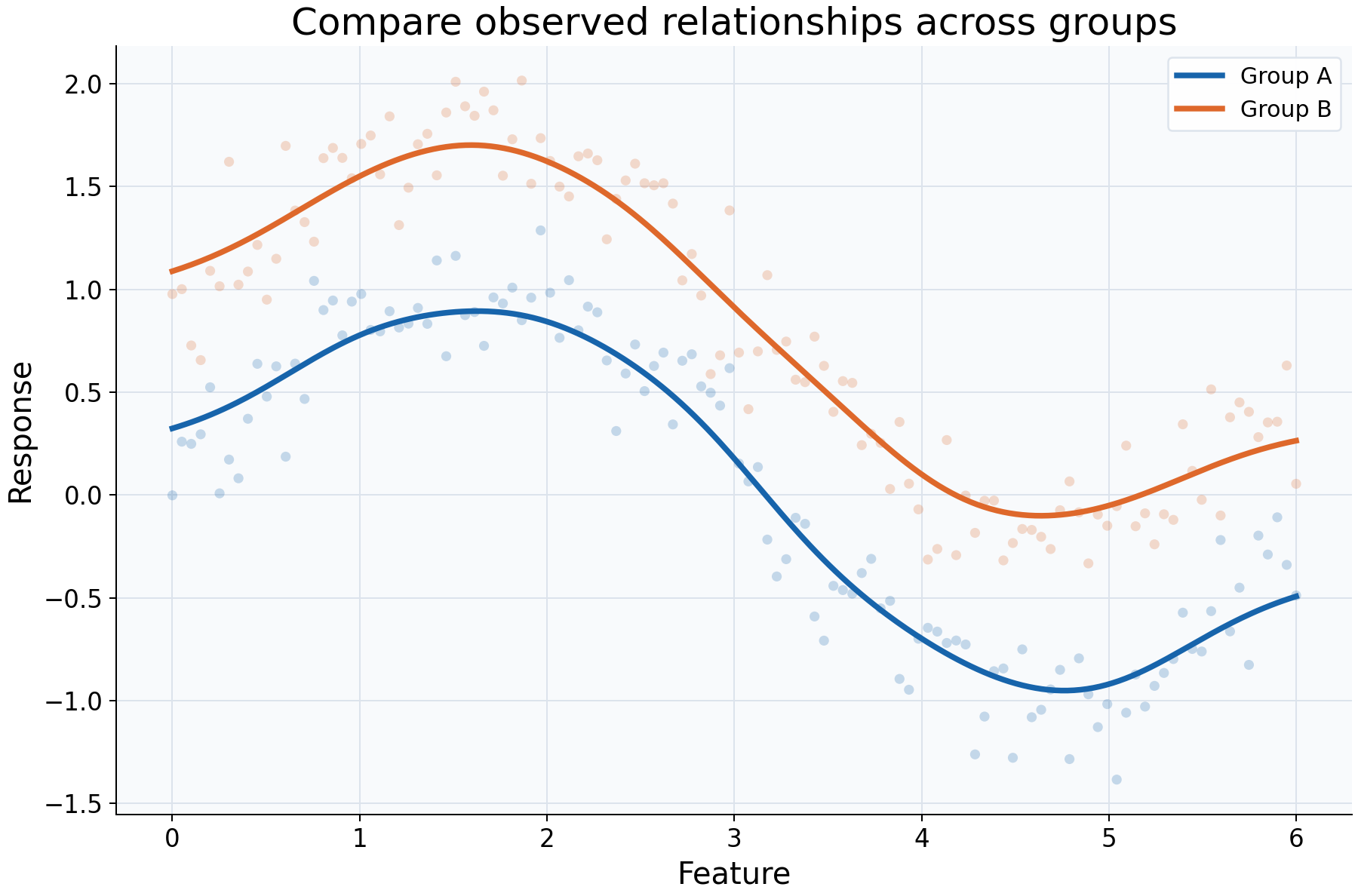
This example reviews whether an observed feature-response relationship differs between two explicitly defined subgroups. Both groups cover the same feature range and are fitted with identical smoothing settings. Group B's generating mean has a known 0.8 response-unit offset; that construction makes a comparison easy to interpret without claiming a real-world group effect.
Choices and their impact
| Item | What is being reviewed | Impact and interpretation |
|---|---|---|
| Blue and orange points | Responses within each subgroup | Show within-group variation and which feature locations have observations. |
| Separate fitted curves | Local averages conditional on feature within each selected group | Each curve uses only its own group's rows; the groups are not pooled into a single fit. |
| Shared bandwidth 0.4 | A consistent smoothing scale | Makes differences in this display easier to compare without confounding the visual comparison with different bandwidth rules. |
| Common feature range and grid | Comparable evaluation coordinates | Curves can be compared at the same locations here. Real groups may have little or no overlapping support. |
| Vertical separation | Difference between fitted local summaries | Describes an observed association between subgroup and response at a feature location; it is not a causal or adjusted effect. |
Interpreting the plot
Compare the groups at the same feature values, rather than comparing their overall response means. Ask whether the difference resembles a roughly constant offset, a change in shape, or a difference visible only in sparsely sampled regions. Keep the observations visible so a smooth curve does not conceal a small or unevenly sampled subgroup.
Identical smoothing settings make the comparison easier to audit, but they do not guarantee equal estimation quality when group sizes or feature densities differ. For real data, select each subgroup explicitly, inspect support and sample sizes, and limit comparisons to ranges where both fits have relevant observations.
When this is useful
Use this workflow to explore relationships across cohorts, segments, experiments, or measurement conditions and to generate questions for a later joint analysis. It helps distinguish a pooled trend from subgroup-specific descriptions.
Separate curves do not control for other differences between groups, establish causality, or supply a formal test of curve equality. Apparent separation can reflect differing compositions or sampling, not an intervention on group membership.
Explore further
Reduce one group's sample size or restrict its feature range. Inspect each fit's
predict_diagnostics before comparing curves. Try a common narrower and wider
bandwidth to check whether the apparent shape difference is smoothing-sensitive.
Run this example
From the checkout, with rgram[plot] installed:
python examples/plot_relationships.py --example subgroups
# Save just this figure without opening a desktop window:
python examples/plot_relationships.py --example subgroups --output-dir /tmp/rgram-figures
Download this standalone example.
The complete code below includes imports, data, configuration, and plotting.
Run the downloaded file with python subgroups.py.
from __future__ import annotations

import argparse
from pathlib import Path
from typing import TYPE_CHECKING
import warnings

import numpy as np

from rgram import KernelSmoother, Regressogram, SupportWarning, quantile

if TYPE_CHECKING:
    from matplotlib.axes import Axes
    from matplotlib.figure import Figure

# A consistent palette makes comparisons readable across the gallery.
COLORS = ["#1764ab", "#de682b", "#21856b", "#8855a2"]


def _create_axes(
    title: str, xlabel: str = "Feature", ylabel: str = "Response"
) -> tuple[Figure, Axes]:
    """Create a readable, single-panel figure with consistent gallery styling."""
    import matplotlib.pyplot as plt

    with plt.rc_context({"font.size": 14, "axes.labelsize": 16, "axes.titlesize": 20}):
        figure, ax = plt.subplots(figsize=(10, 6.6), layout="constrained")
        ax.set(title=title, xlabel=xlabel, ylabel=ylabel)
    ax.set_facecolor("#f8fafc")
    ax.grid(color="#dce3ec", linewidth=0.8)
    ax.set_axisbelow(True)
    ax.spines[["top", "right"]].set_visible(False)
    ax.tick_params(labelsize=13)
    return figure, ax


def _plot_observations(ax: Axes, X: np.ndarray, y: np.ndarray) -> None:
    """Show original rows without connecting them or hiding response spread."""
    ax.scatter(
        X,
        y,
        color="#64748b",
        alpha=0.4,
        s=28,
        edgecolors="none",
        label="Observed responses",
    )


def _add_legend(ax: Axes) -> None:
    """Identify every plotted comparison using the same readable legend style."""
    ax.legend(fontsize=12, framealpha=0.96, edgecolor="#dce3ec", loc="best")


def _gaussian_smoother(bandwidth: float, **kwargs) -> KernelSmoother:
    """Keep kernel and bandwidth units explicit; kwargs select other model options."""
    return KernelSmoother(
        kernel="gaussian", bandwidth="manual", bandwidth_value=bandwidth, **kwargs
    )


def subgroups() -> Figure:
    """Fit explicitly selected groups with a common bandwidth and query range."""
    rng = np.random.default_rng(12)
    X = np.linspace(0, 6, 120)
    # Both groups occupy the same range, making their curves comparable here.
    query = np.linspace(0, 6, 350)
    figure, ax = _create_axes("Compare observed relationships across groups")
    # Generate each subgroup explicitly; the offset is known in this simulation.
    for group, offset, color in zip(("A", "B"), (0.0, 0.8), COLORS):
        y = np.sin(X) + offset + rng.normal(0, 0.2, len(X))
        # Fit only this group, using common settings rather than automatic
        # group-specific bandwidths. This does not adjust for other variables.
        model = _gaussian_smoother(0.4).fit(X, y)
        # Keep each group's raw spread visible behind its mean curve.
        ax.scatter(X, y, color=color, alpha=0.23, s=28, edgecolors="none")
        ax.plot(query, model.predict(query), color=color, lw=3, label=f"Group {group}")
    _add_legend(ax)
    return figure

if __name__ == "__main__":
    import matplotlib.pyplot as plt

    figure = subgroups()
    plt.show()
    plt.close(figure)